
Disclosure
We recommend all products independently of 3rd parties including advertisers. We earn advertising fees from:
• • • • •

• • • • •
Amazon
As an Amazon Associate we earn from qualifying purchases.
• • • • •
MIDI, or Musical Instrument Digital Interface, has advanced music technology for decades. MIDI has always been relevant in music production and continues to increase with new plugins and new ways of using it, even outside of music.
New MIDI controllers have brought back the 5-pin connections and the ability to control other hardware. For live shows, bands like Periphery run their rigs with metronome synchronized patch switching via MIDI.
We have selected the best MIDI interfaces for connecting your computer, tablet, or phone to your other MIDI gear. This guide includes products with inputs ranging from 1 to 4 x 4 I/O configurations.
Note that these most popular MIDI interfaces are class-compliant so that you can use them with iOS or Linux. Read the “Things to Consider” section if you plan to use one with an iPad or iPhone.
Also, here’s one ‘weird trick’ that might save you time when using many of these interfaces. The In/Out cables are often labeled technically correct, but this initially confuses many users. The MIDI cable marked ‘In’ should go into your keyboard’s ‘Out‘ port and vice versa.
Without further ado, here are the best MIDI interface selections for PC / Mac / iOS.
The Best MIDI Interface Units of 2024
| Gearank* | SRC* | Check Price | ||||||
|---|---|---|---|---|---|---|---|---|
| Wireless | ||||||||
 | Yamaha MD-BT01 | 89 | 700+ | |||||
 | CME WIDI Master | 86 | 700+ | |||||
| Wired | ||||||||
 | iConnectivity mio | 92 | 800+ | |||||
 | iConnectivity mioXC | 93 | 40+ | |||||
 | Miditech MIDIFACE - 4x4 | 91 | 300+ | |||||
 | CME U6MIDI Pro | 91 | 175+ | |||||
Author & Contributors
Raphael Pulgar
I've been an audio engineer for 20 years specializing in rock and metal recordings. I also play guitar and produce original music for my band and other content creators.
Wireless
Yamaha MD-BT01
Cons
- Only iOS and macOS supported
- Problem with app support for firmware updates. iOS only firmware updates via app
Pros
- Convenient wirefree experience
- Uses MIDI power
- Latency is there but not too bad
The Yamaha MD-BT01 is a Bluetooth MIDI adapter that allows you to wirelessly connect to midi gear via the old-school 5-Pin DIN midi connectors. For example, you can hook this up to a Yamaha DX7 and use it as a MIDI controller and a sound module. It's a pretty nifty and convenient little device, and since it sips its power from the MIDI connection, no wires are required. Remember that some MIDI devices don't provide power and won't work with the MB-BT01.
It's made to work with Mac and iOS devices, which is what I used for this review. Windows and Android users have also been able to get it working, but Yamaha has yet to support it officially, so it seems a little hit-and-miss. The adapter uses the Bluetooth Low Energy (BLE) MIDI standard, which was released by Apple in 2015.
You connect the MD-BT01 to your MIDI gear's MIDI IN and OUT. There are directional arrows to indicate which of the two connector ports connects to which, but for those who've connected MIDI gear before, they don't only help a little since, usually, the MIDI IN connects to the MIDI OUT on the other side. That's not the case here, as the brief 'manual' points out, so the 'in' arrow actually goes to the MIDI IN and so forth. Once you connect and switch your MIDI gear on, the light should flash, and you're ready to connect.
The important point is that BLE MIDI is NOT the same as 'classic' Bluetooth that you would normally use for music playback. Some frustrated users leave negative reviews because they didn't realize this. Yamaha doesn't make this as clear as they should in their brief instruction 'manual' either, but it is there. Instead of looking to make a Bluetooth connection in the usual place, you need to use the 'Audio MIDI Setup' app on macOS or iOS. You need to load up a compatible app to get the connection going. There are a lot of compatible apps in iOS including Garageband and even a dedicated third party connection app called 'midimittr' that is well regarded for connecting.

Yamaha MD-BT01 connected to a Boss SY1000 Pedal for use with the a Looper app
I connected several of my MIDI devices with the unit; they all connected reliably and worked well. My trusty old Ensoniq SQ-80's polyphonic aftertouch flowed through perfectly to apps that can use it like Moog's Animoog Z. The weighted digital piano came through on Garageband quite smoothly, and I struggled to tell whether any latency was due to the unfamiliar resistance of the keys or BLE MIDI. Even a multi-effects pedal worked to control the 'Loopy' app. It also works well for transmitting MIDI' system exclusive' messages, which can often trip up MIDI adapters.
Some people have reported issues with 'jitter' - random small changes in latency. I haven't experienced this as an issue, and most owners don't have problems. However, if you're an exact player or looking to use this for percussion, then it could be a good idea to trial BLE MIDI before committing your entire setup to it.
Minor jitter issues aside, this is a good piece of gear that helps you reduce your cable clutter. It also helps that it is one of the most popular MIDI interfaces available.
Specifications
- Number of MIDI Ports: 1 MIDI In, 1 MIDI Out
- Compatibility: Bluetooth LE MIDI. Compatible with iOs 8 or later and Mac OSX Yosemite or later with Bluetooth 4.0 installed.
- Power Supply: Powered by MIDI Connection
- Size: 0.67"(W) x 2.63" (D) x 0.67"(H)
- Weight: 0.81oz
| Website | Source | *Rating Value |
| Gearank | Daniel Barnett | 85/100 |
| Technology in Music Education | Christopher J. Russell, Ph.D. | 90/100 |
CME WIDI Master
Cons
- 2 WIDI Masters for non-Bluetooth gear
- Might require MIDI knowledge for beginners
Pros
- 20 meters/65 feet of unobstructed range
- Ultra low latency of 3ms
- Easy to setup
- Plug and play
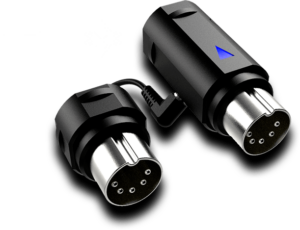
For your next MIDI interface with a good wireless range and straightforward setup, I can say that the WIDI Master wins the price here. They've proven that it is possible to untether yourself without the disturbing latency of Bluetooth devices.
The WIDI Master features ultra-low latency of just 3ms and reliably transfers data to iOS and Android. It's made possible through their Smart Connectivity Algorithms or SCA.
While standard MIDI cables transmit 31.25 kbps of data, any WIDI Interface transmits 400 kbps.
There's no need for batteries or external power—connect it, and it will get power from your MIDI gear.
The outstanding feature of this MIDI interface is that you get a whopping 65 feet range. Like any wired MIDI interface, it has 1 MIDI IN/OUT. For more elaborate signal routing, it is configurable via the WIDI app if you manage two or more devices. If you're connecting to an iPad or an Android phone, the setup is as straightforward as possible. You might need to have a cursory knowledge of MIDI for two or more devices to route it properly.
As for two non-Bluetooth MIDI gears, for instance, a MIDI controller and a drum machine, you need two WIDI masters. It might be expensive to set up this way, but once their assignments have been configured, they will automatically pair.
Let's say you want to transfer the WIDI Master, a 25-key MIDI controller, to an 88-key controller. It's just a matter of plug-and-play and is still paired with the other gear you want to control.
Regardless of the setup, this is primarily meant to access your iOS or Android sound libraries easily. It's also ideal for home studio producers and gig performers who don't want wires cluttering their setup.
Specifications
- Number of MIDI Ports:1 MIDI IN/OUT
- Compatibility:macOS, iOS, Android, Mac or Windows via Bluetooth
- Power Supply:MIDI power. No external power option.
- Size:Not specified
- Weight:Not specified
Wired
iConnectivity mio
Cons
- iConfig software clunky to use
- 5ft cable might be too short
Pros
- Plug and Play
- No noticeable latency
- Sturdy build
- Affordable
The mio is a USB Class Compliant (plug-and-play) bus-powered MIDI interface. It is a low-latency and affordable option for basic single-device MIDI connections.
There's a free companion controller app called "iConfig" available for Windows, Mac, and iOS that allows you to route and process MIDI in various ways and update the device firmware.
The plug-and-play class-compliant interface is an excellent choice for future-proofing your setup.
The iConfig software is complicated but only used for more advanced features. SysEx messages may also cause problems, but that goes for many MIDI interfaces. Also, the 5-foot cable might need longer.
Cons aside, the iConnectivity mio is excellent if you want a simple and reliable MIDI interface.
Specifications
- Number of MIDI Ports: 1 MIDI In, 1 MIDI Out
- Compatibility: Class Compliant and compatible with Windows, Mac, iOS (via CCK/Lightning adaptor) and Linux
- Power Supply: USB
- Length: 5ft
- Weight: 3.5 oz
| Website | Source | *Rating Value |
| Youtube | Tayvon Gwira | 90/100 |
iConnectivity mioXC
Cons
- Does not include a manual in the package
- Cable labeling might confuse users new to MIDI
Pros
- Great compatibility and future proofing
- Works well with mobile devices
- Stable SysEX and MIDI transfers
The iConnectivity mioXC is a 1 x 1 USB-C MIDI interface that allows up to 16 channels of MIDI data to be transmitted to and from various devices. The USB-C connection makes it easier to interface Hardware Synths with mobile devices running iOS or Android.
Equipped with a 32-bit ARM Cortex processor and well-engineered shielding, the mioXC provides stable data transfers for MIDI and SysEX information.
Thanks to constant driver updates and support, the mioXC runs great even on the latest (as of writing) Mac OS, Monterey. This allows it to bridge the gap between modern computer software and vintage synthesizers.
One thing that might trip up users is the lack of labeling on the MIDI IN/OUT. This would be fine to figure out for veterans, but for those unfamiliar, the OUT cable goes into the IN port and vice versa.
Specifications
- Number of MIDI Ports: 1 MIDI In, 1 MIDI Out
- Compatibility: Class Compliant with MAC OSX, Windows XP SP2, Windows Vista, Windows 7, 8 and 10
- Power Supply: Powered by USB-C
- Size: 5.71" x 0.98" x 4.41"
- Weight: 5.9oz
Miditech MIDIFACE - 4x4
Cons
- Not the most compact form factor
Pros
- Multiple I/O enables complex setups
- Up to 64 Channels with the included MIDI cable
Miditech is a company based in Cologne, Germany, and has been making music gear for over two decades.
The Miditech MIDIFACE is a straightforward, class-compliant 4 in / 4 out interface that works with MIDI devices like a keyboard controller and is compatible with most major operating systems.
Its configuration allows up to 64 MIDI channels via the USB cable included.
Its simplicity and class compliance make it a great hub for even more complex midi routing. The class compliance ensures compatibility with many operating systems. However, it's important to note that in my research, I've found a few people having trouble with specific Windows 10 updates, though this seems to have been resolved as of this edition of the guide.
Still, if you're looking for a MIDI interface with multiple ports, the Miditech MIDIFACE 4 x 4 is a stellar pick.
Specifications
- Number of MIDI Ports: 4 MIDI In, 4 MIDI Out
- Compatibility: Class Compliant with MAC OSX, Windows XP SP2, Windows Vista, Windows 7, 8 and 10
- Power Supply: Powered by MIDI Connection
- Size: 9.25" x 6.93" x 2.83"
- Weight: 15.5oz
CME U6MIDI Pro
Cons
- Requires extensive MIDI routing knowledge
- Not for beginners
Pros
- Versatile
- Error-free synchronisation
- Fully customizable
Complex setups require tweaking and an error-free MIDI routing experience. You also want all of those MIDI data to trigger only the proper channels accurately to ensure your performances go as smoothly as possible.
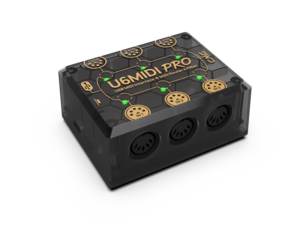
It's pluggable via USB C and can also be used with a 5V power supply. It has 3x MIDI IN/OUT with a transmission delay close to 0ms, so whatever devices you have, it ensures you don't get any noticeable latency.
The CME U6MIDI Pro is not for the faint of heart. This specific MIDI interface takes your routine up a notch and allows you to control and assign what MIDI messages get triggered by what device.
The configuration potential of its desktop software, the UxMIDI Tools, allows you to route, map knobs and faders, and filter out any MIDI messages. The MIDI filter, I'd say, is the notable feature because this will prevent any cross-talk from different MIDI gears.
This is an invaluable tool for those who use a keyboard controller assigned to different MIDI devices like a sound module, a drum machine, or synth modules.
Specifications
- Number of MIDI Ports:3 MIDI IN/OUT
- Compatibility:macOS, iOS, Windows, Android, Linux and Chrome OS
- Power Supply:USB-C or 5V power supply
- Size:3.25 in (L) x 2.52 in (W) x 1.32 in (H)
- Weight:99 g/3.49 oz
Things To Consider When Buying A MIDI Interface
- Simply put, it's a device that allows you to connect MIDI devices, such as hardware synths and keyboards that use 5-pin MIDI jacks, to your computer or tablet. The next question is, What is MIDI The short answer is "Musical Instrument Digital Interface." It is a protocol used by musical devices to communicate with each other.
Nowadays, the simplest way to use MIDI is to use a MIDI controller. The best 25 key midi controller gives you control over all the basic MIDI features.
- Some MIDI interfaces from popular brands come with "Y" cables: 2 MIDI connectors (1 In/1 Out) on one end and a USB connector. Some have multiple MIDI sockets, which is usually necessary if you want to connect multiple MIDI controller devices at the same time—an example would be connecting an Electronic Drum Set and a MIDI Keyboard to your computer. You can usually daisy-chain MIDI output (receiver) devices through a single computer connection, though.
With Apple lightning cables, MIDI Interfaces are compatible with iOS devices, such as iPhones or iPads. Any class-compliant USB device can be connected to iOS devices via an Apple Camera Connection Kit or Lightning adapter - note that your iOS apps must use CoreMIDI. Part of learning How to use MIDI keyboard controllers is understanding connectivity.
- Many MIDI interfaces don't need additional AC power cables or batteries and can be powered via USB when plugged into a PC, Mac, or Linux box.
Important information for iPad users: The iPad limits the amount of power available to USB devices, so even though you can use Class Compliant interfaces with it, you may need to use a Powered USB Hub (link to Amazon.com) to provide sufficient power. This does not apply if your MIDI interface has its power adapter.
- Class-compliant devices are plug-and-play devices that don't need extra drivers to work (although manufacturers often supply them anyway). Although theoretically, any class-compliant device should work with any operating system that supports it, you may have trouble with older operating systems. So, if you don't have the latest version of your OS, then check the compatibility information carefully before purchasing (or upgrade to the latest OS if you can).
- MIDI devices come in 3 ports: In, Out and Thru. An interface with single MIDI In and Out ports is enough to connect one MIDI controller (i.e., keyboard) to a computer, and usually, you can also daisy chain to other MIDI receiver units (such as sound modules) using the Thru ports in these. If you want to use multiple MIDI controllers, you'll generally need multiple MIDI input ports for your computer. Also, it can be easier to control multiple MIDI receiver units with each having their own dedicated port, and this can also reduce latency when there's a lot of MIDI data flying around. Another reason to have more MIDI channels is if your sound modules don't have a MIDI Thru port for daisy chaining. Each MIDI port contains 16 channels.
Most people with simple studio setups can manage with single-in/single-out MIDI port interfaces. However, interfaces with multiple I/O ports are useful for studios with several different MIDI sources, such as analog synthesizers or rackmount gear with DAW-controlled MIDI switching and automation. If this is your studio setup, the Miditech MIDIFACE should be worth checking out.
What is a MIDI Interface?
Connectivity
Power
Class Compliant USB MIDI
Number of MIDI Ports (Input/Output/Thru)
Best MIDI Interface Selection Methodology
The first edition was published in 2017 and the current edition was published on May 10, 2024.
We looked at all the popular and highly rated MIDI interfaces available from major American music gear retailers and short-listed the 23 most promising for detailed analysis. During this procedure we processed more than 16,000 individual review and rating sources from user and expert reviews and forum comments, using the Gearank Algorithm to produce rating scores out of 100 for each interface. We then selected the highest rated options to recommend above. For more information about our methods see How Gearank Works.
About the Author and Contributors
Here are the key people and sources involved in this guide's production - click on linked names for information about their music industry backgrounds.
Lead Author & Researcher
Raphael Pulgar
I've been an audio engineer for 20 years specializing in rock and metal recordings. I also play guitar and produce original music for my band and other content creators.
I've had experience with recording MIDI instruments such as electronic drums and keyboard controllers throughout my career. And even if I have an audio interface, having a dedicated MIDI interface definitely was a good addition. Those working with USB Audio Interfaces with no MIDI capability will especially benefit. Most modern synths have USB I/O, older synths can work with modern setups with a good MIDI interface.
Contributors
Allen Articulo: Product Research and Co-Writer
Daniel Barnett: Yamaha MD-BT01 Review.
Jason Horton: Editing and Illustrating.
Media
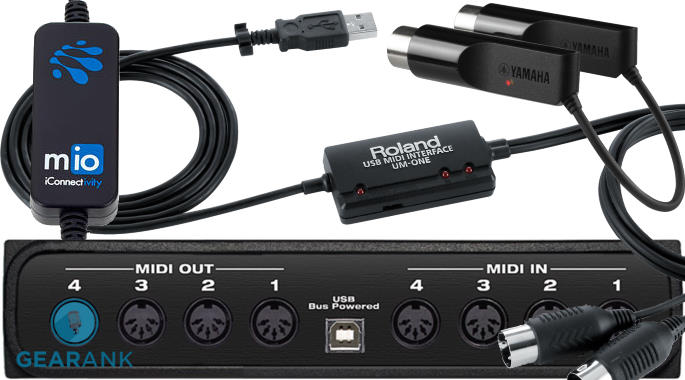
Main/Top Image: Created by Gearank.com using photographs of the iConnectivity mio, Roland UM-ONE mk2, Yamaha MD-BT01 and MOTU micro lite.
The individual product images were sourced from their respective manufacturers' websites, promotional materials or supporting documentation except for Yamaha MD-BT01 connected to a Boss SY1000 Pedal which was photographed by Daniel Barnett.

Could you add latency numbers / measurements for these devices?
Hi Marc
Unfortunately, we can’t. Latency is a tricky thing to measure and present since it’s also dependent on the kind of specs your computer is running. Most modern audio interfaces hover around less than 10ms even at a buffer size of 128. Dropouts are also a concern and the point where you experience stuttering can vary depending on Processor or RAM load.
-Raphael
The following MIDI interfaces came off our recommended list when we published the September 2022 Edition:
Publication of our June 2021 Edition resulted in the following MIDI interface coming off the recommended list above, but you can still see our analysis of it: IK Multimedia iRig MIDI 2.
As a result of our April 2020 update the following MIDI interfaces came off the recommended list above, but you can still see our analysis of them:
What was the reason why they were no longer recommended? They no longer works? I bought a MidiPlus “MIDI 2×2 USB MIDI interface” running on Windows 10 and it doesn’t work reliably. I’m wondering if this is related to the April 2020 Update? Would a future Windows 10 update fix this?
The MidiPlus Tbox 2X2 USB MIDI Interface was removed from our recommended list because it was no longer available to buy.
Given that it uses USB class compliant drivers it’s unlikely that a simple Windows update will fix the problem. If you are having other problems with Windows then reinstalling Windows 10 *might* fix it, but I can’t guarantee that it will – there could be other software causes or even malfunctioning USB hardware.
If you want tech support you could contact the manufacturer – you’ll find their email address on this page of the MidiPlus website.
The following MIDI interface has been removed from our recommended list above due to a lack of availability: M-Audio MIDISPORT 2×2 Anniversary Edition.
As a result of a minor update today we have removed the following from our recommended list above: M-Audio MIDISPORT 1×1.
Great comparative study, very clear and what I have been looking for for’quite Some time. Don’t know why I didn’t find the article earlier.
Thanks a lot for your great work.
Thank you very much for your appreciation of the work we do – remember to check with us first next time!