
Disclosure
We recommend all products independently of 3rd parties including advertisers. We earn advertising fees from:
• • • • •

• • • • •
Amazon
As an Amazon Associate we earn from qualifying purchases.
• • • • •
The purpose of this guide is to shine a light on some of the interesting possibilities beyond MIDI keyboard controllers, featuring the best MIDI Pad controller units in the market today.
MIDI is not a new thing in music. It’s like magic but can have a negative connotation with phrases like “It sounds MIDI” or “It’s not real music if it’s MIDI” getting thrown around by the less informed. When in actuality, MIDI doesn’t have a sound! It’s a universal control protocol.
At the end of the day, MIDI is all about about expression – turning your ideas into reality.
MIDI pads has a wide variety of uses, from triggering samples to being a percussion and drum controller. Let’s dive into the wonderful world of MIDI pad controllers.
The Best MIDI Pad Controller Units – 2024
| Gearank* | SRC* | Check Price | ||||||
|---|---|---|---|---|---|---|---|---|
 | Akai Professional Fire | 93 | 1200+ | |||||
 | Novation Launch Control XL | 93 | 475+ | |||||
 | Novation Launchpad X | 94 | 900+ | |||||
 | Akai Professional APC40 MKII | 94 | 1000+ | |||||
 | Native Instruments Maschine MK3 | 96 | 1350+ | |||||
 | Ableton Push 2 | 96 | 1250+ | |||||
| Author's Pick | ||||||||
 | Roger Linn Design LinnStrument | 91 | 40+ | |||||
Author & Contributors
Alden Acosta
I'm a drummer and former lead guitarist of the band Callalily, a platinum selling multi-awarded band from the Philippines. I also studied music for 6 years majoring in percussion and jazz studies with a minor in classical piano.
Akai Professional Fire
Cons
- With only 2 velocity levels in the pads, velocity sensitive is a rather generous way to describe them
- Pad feel is mushy and not recommended for finger drumming
- Lacks in-depth integration with the included Image Line VST instruments of FL
- Underwhelming screen
Pros
- Specifically designed for FL Studio, the first of its kind
- Makes sequencing on the fly a breeze
- Has the ability to chain up to 4 units for modular expansion, turning it into one big control surface.
- Solid build quality while remaining light
- Priced relatively affordably
The Akai Professional Fire is a purpose-built pad controller for FL Studio, a popular DAW competing with Ableton Live in performance and creation.
It features a hardware representation of the iconic step sequencer view of FL, inherited from its Fruity Loops days.
More than fittingly, this collaboration between software company Image Line and hiphop hardware legend Akai (the company behind the MPC) has produced the very first hardware controller designed specifically for this DAW, featuring 4 assignable touch capacitive knobs to go along with its 4 x 16 (64) matrix of velocity-sensitive RGB MIDI drum pads.

Fruity Loops just brings back memories! It is used by many prominent hip hop and EDM producers, including Porter Robinson, Madeon, Soulja Boy, Avicii (RIP), and Deadmau5.
The 20 dedicated function buttons are also backlit and pertain to many useful features inside the software such as navigation, transport and mute/solo functions although being quite a minimalist MIDI drum pad you won't be able to ditch your mouse entirely.
From the makers of the MPC comes this solid offering for FL Studio intermediates. If you're a fan of FL sequencing and you want to streamline your workflow, the Akai Professional Fire is the best MIDI drum pad for you.
Specifications
- Pads: 4 x 16 control matrix with velocity-sensitive RGB pads
- Buttons: 15 x Navigation and Transport controls.
- Knobs: 4 x Assignable, Touch-capacitive Knobs ,
- Other: LCD display
- Analog Inputs:None
- Analog OutputsNone
- Standalone Mode: No
- Power: 15V DC power supply (included) / USB bus power
- Connectivity: USB S
- Compatibility: Windows 7 SP1 or later, OS X 10.11 or later, FL Studio 20.0.5 or later
- Software Bundle: No Software included (controller only)
- Dimensions: 12.44" x 6.55" x 1.69"
- Weight: 1.68 lbs.
| Website | Source | *Rating Value |
| Music Tech | Andy Jones | 80/100 |
| Digital DJ Tips | Joey Santos | 80/100 |
Novation Launch Control XL
Cons
- Lacks a screen or other visual feedback requiring you to still rely on your computer monitor
- Send knobs only customizable through the proprietary software and template
- No dedicated MIDI ports, only MIDI via USB limiting its use with hardware synths without a USB-MIDI Host
Pros
- Support for Mac, Windows and iOS (With the use of a Camera Connection Kit)
- Fully customizable layout with included software editor
- Easy to setup and fully integrated with Ableton's mixer view
- Sturdy construction with a small footprint
The first entry from Novation into this list is the Launch Control XL.
Veering away slightly from the pad performance form factor, this beast of a controller is designed for production geeks and laptop engineers alike with its mixer like layout.
Sporting 24 rotary pots with 300 degree motion and Eight 60mm Faders this MIDI controller is designed to integrate with Ableton Live's mixer view.
Pair it with the Launchpad X and you get a fully functional portable music production setup fully capable to perform and create in countless situations.
Whether you're a DJ, mixer or producer, the Novation Launch Control XL is a worthy little addition to your Ableton Live hardware outfit.
Specifications
- Pads: 16 assignable multi-color backlit pads
- Buttons: 8 assignable backlit buttons, 2 backlit template select buttons
- Faders: 8 60mm Faders
- Knobs:24 rotary pots with 300 degree motion
- Power: USB bus power
- Connectivity: USB-B
- Compatibility: Windows 7 SP1 or later, OS X 10.11 or later, iOS (Camera Connection Kit Required), Ableton Live (version 9 or later), HUI compatibility for mixer control in DAWs including Cubase, Logic Pro and Pro Tools
- Software Bundle: Ableton Live Lite 10, 4GB Free LoopMasters Samples
- Dimensions: 9.4" x 9.4" x 1.5"
- Weight: 2.2 lbs.
| Website | Source | *Rating Value |
| Synthtopia | Synthtopia | 80/100 |
| Digital DJ Tips | Josh Rackstraw | 80/100 |
Novation Launchpad X
Cons
- No MIDI out to use directly with hardware synths
- Toggling between modes is not as straightforward as other models in the range
- Not suitable for mixing duties
Pros
- Gains velocity sensitivity and core Ableton instrument workflows from the Pro, its more expensive sibling
- New and improved slim design from its predecessors while retaining a high level of build quality
- Incredibly sensitive pads with polyphonic aftertouch
- New custom modes and excellent flexibility in pad configuration
- RGB programming perfect for mesmerizing pad light shows
The Launchpad X is the third and current iteration of Novation's discrete Ableton clip pad launcher.
Thinner, lightweight and more streamlined than the highly popular Launchpad, the X introduces velocity and pressure sensitivity greatly improving upon its predecessors' expressiveness as a controller of light and sound.
It also carries over some features from its more expensive siblings like note/scale mode.
The Novation Launchpad X represents the evolution of an iconic pad controller line. Now better than ever, if pad performance is your bag - you would be hard pressed to find a device as balanced in features and elegance as this one.
Specifications
- Pads: 64 Velocity and Pressure Sensitive RGB pads
- Buttons: 16 x Multi Purpose buttons for transport, clip control and settings.
- Knobs: none
- Other: none
- Analog Inputs:none
- Analog Outputsnone
- Standalone Mode: no
- Power: USB bus power
- Connectivity: none
- Compatibility: macOS 10.13 or later, iOS 9 or later , Windows 10 or later
- Software Bundle: Ableton Live Lite 10, Klevgrand R0Verb and DAW Cassette, Softube Time and Tone bundle, Sound Collective access and more
- Dimensions: 9.48" x 9.48" x 0.68"
- Weight: 5.9 lbs
| Website | Source | *Rating Value |
| Strong Mocha | Thorsten Meyer | 100/100 |
| Sound on Sound | Simon Sherbourne | 96/100 |
Akai Professional APC40 MKII
Cons
- Short fader throw compared to Novation Launch Control XL
- Not programmable beyond Ableton and MIDI
- Only five rows of launch buttons
- Still lacks velocity sensitive pads for expressive performance
Pros
- Improved knob layout compared to MKI
- Useful, assignable RGB lights on the pads
- Smaller and lighter than past version
- Gig ready build quality
The APC 40 Mk2 is Akai's latest iteration of their collaboration with Ableton going back to the pre iPad days of 2009.
This controller is designed to be an all-in-one controller specifically designed to work with the Ableton DAW featuring faders, a 9 x 5 grid of RGB rubber pads among other niceties making this pad station a tactile companion to your performance and production duties.
The mark 2 brings some well thought out performance enhancements such as workflow and layout improvements, and bolstered scene launching through the introduction of shape and color–coding increasing visual integration between the hardware and software.
The APC40 MKII is for those who want an assortment of control options (pads, knobs, faders, crossfader and buttons).
Just make sure you're okay with the compromises of having everything in a small package and not having velocity sensitive pads.
Specifications
- Pads: 40 (5x8 matrix) clip-launch pads with RGB feedback
- Buttons: 5 x Scene Launch Buttons, 9 x Clip Stop Buttons, 9 x Track Selector buttons, 8 x Track buttons, 8 x Device Control buttons, 3 x Transport Buttons, 3 x Assignable buttons, 4 x Pad Banks Select buttons
- Knobs: 8 x Assignable knobs, 8 x Control knobs, 1 x Tempo knob
- Other Controls: 9 channel faders, 1 Crossfader
- Analog Inputs: none
- Analog Outputs none
- Standalone Mode: No
- Power: USB-powered
- Connectivity: USB Slot, Footswitch Input, Kensington Lock Slot
- Compatibility: Mac with Mac OS X 10.5, Windows XP, Vista, 7, 8 or 10
- Software Bundle: Ableton Live Lite with Puremagnetik Effect Racks, Hybrid 3 by AIR Music Tech, SONiVOX Twist, Prime Loops sample packs, and Toolroom Records artist launch packs
- Dimensions: 16.7" x 10" x 1.8"
- Weight: 3.97 lbs
| Website | Source | *Rating Value |
| Mac Pro Video | G.W. Childs IV | 96/100 |
| DJWORX | Darren E. Cowley | 100/100 |
Native Instruments Maschine MK3
Cons
- The Maschine 2 software may have a steep learning curve for some and is limited in functionality when compared to full DAWs
- Some basic functions require multiple steps and finger tap dancing
- Great beat pad for generating ideas, not for complex music production
Pros
- Excellent Screens
- Responsive and good feel in the large velocity sensitive pads optimal for performance
- Now includes an audio interface and a touchpad strip over past versions
- Refined hardware look and feel
The Maschine MK3 is native instrument's latest version of their 4 x 4 MIDI drum pad controller that comes with its own integrated software.
An absolute powerhouse in sampling, sequencing, VST synth and sound library triggering, this hardware is an extension of the Maschine 2 software similar to the MPC Studio series of Akai.
Sporting 2 vibrant color screens, this boasts a fast and intuitive workflow with minimal faffing and its no surprise to see it garner a top Gearank rating along with the Push 2.
The generous inclusion of an integrated Audio Interface includes balanced stereo inputs and outputs, MIDI in and out, a microphone input with gain control and a headphone output with gain control making this device viable to be the centerpiece of your composition studio.
Native Instruments' Maschine is a groovebox ecosystem of hardware and software. The MK3 version of the controller brings a lot of new improvements to the table for composers and beatmakers alike.
If you love using software and libraries from the Native Instruments catalog, the Maschine MK3 is the flagship controller albeit with a percussion twist in lieu of a piano keyboard.
Specifications
- Pads: 16 Large Velocity Sensitive Backlit Pads (Linear Curve)
- Buttons: 16 x Multi Purpose buttons, 21 x Function Buttons, 8 x Solo/Mute/Transport buttons, 13 x Pad function buttons
- Knobs: 1 x Universal Multidirection Encoder Knob, 8 assignable encoder knobs with capacitive touch sensitivity
- Other: 1 x Dual Touch Smart Strip, Dual high-resolution color displays
- Analog Inputs:2 x 1/4" (line in), 1 x 1/4" (mic in)
- Analog Outputs2 x 1/4" (line out), 1 x 1/4" (headphones)
- Standalone Mode: Yes
- Power: 15V DC power supply (included) / USB bus power
- Connectivity: MIDI I/O, USB Slot, Kensington Lock Slot
- Compatibility: Mac with Mac OS X 10.5, Windows XP, Vista, 7, 8 or 10
- Software Bundle: 8GB built in sample library, 25 GB Komplete 11 Select library
- Dimensions: 12.6" x 11.85" x 1.61"
- Weight: 5.9 lbs
| Website | Source | *Rating Value |
| Mac Pro Video | Hollin Jones | 90/100 |
| The Verge | Dani Deahl | 80/100 |
Ableton Push 2
Cons
- Steep learning curve especially if you're an Ableton beginner
- Less than ideal third party VST control
- Not optimized for Arranger View in Ableton
- No faders for track mixing
Pros
- Large, high resolution and bright colored screen
- Highly regarded pad feel and responsiveness
- Now includes an improved button layout and MPE (MIDI Polyphonic Expression) over the Push 1
- Deepest software and hardware integration straight from the folks at Ableton
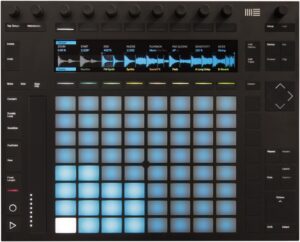
The Push 2 is Ableton's very own hardware expression of their highly acclaimed Ableton Live Software.
While the original Push was a collaboration between Akai and Ableton, this controller is Ableton all on their own, and they pulled out all the stops in creating the highest rated pad controller for this edition along with the Maschine MK3.
The Push 2 has been lauded as the best controller for Ableton by many of its loyal users and new to the Push 2 is the gorgeous high resolution, fast refresh display and newly designed pads that are touted to be some of the best in the MIDI pad controller world.
It also includes a touch strip for pitch or modulation effect control.
The Push 2 is a powerful and creative hardware companion to Ableton Live. Ableton took the Push idea and refined it even further. When it comes to Ableton Live, this is the best MIDI drum pads controller.
Specifications
- Pads: 64 (8x8 grid) velocity pressure sensitive pads with RGB backlighting
- Buttons: 31 x Navigation LEDs
- Knobs: 11 x rotary encoder knobs
- Standalone Mode: Yes
- Other Controls: 17cm touch strip for pitch bend/scrolling
- Power: USB Powered, 12V DC Power supply,
- Connectivity: USB Slot, 2 x Pedal Inputs, Power Supply Connector, Kensington Lock
- Compatibility: USB Class Compliant
- Software Bundle: Quick Start Guide + Download version of Live 9 Intro Standard or Suite
- Dimensions: 14.88" x 11.96" x 1.65"
- Weight: 6.0 lbs
| Website | Source | *Rating Value |
| Noisegate | Leroy Amphlett | 100/100 |
| Sound on Sound | Nick Rothwell | 90/100 |
Author's Pick
Roger Linn Design LinnStrument
Cons
- The sensor technology has some noted limitations
- Requires a hefty time investment to learn a new instrument especially if you're not already versed in a related instrument (mostly stringed instruments)
Pros
- Highly customizable with the use of its open-source firmware
- A unique instrument altogether that unlocks creative performances
- Extremely sensitive pads
- Premium build quality with steel top panel, aluminum chassis and cherry wood sides
I decided to use my author's pick to highlight what I believe is a glimpse into the future of MIDI instruments.
Ever the innovator, Roger Linn the inventor of the MPC came up with an instrument like no other in the LinnStrument.
Not a keyboard, not a percussion pad, the LinnStrument is very much an instrument you could imagine being quite at home in a Star Trek episode.
Its layout is slightly similar to a stringed instrument (tuned like an 8 string bass guitar by default). It has semitone increments allowing for 5 dimensions of expression (strike velocity, Z axis pressure, X axis left to right , Y axis front to back and release velocity) rivaling the expression of a fine acoustic instrument and flying in the face of those claims of acoustic instrument superiority over MIDI instruments.
If you're looking for something new to spark your creativity or set you apart from the heard of instrumentalists, why not try a new one who's future is being created this very moment.
Who knows, the future greatest virtuoso LinnStrumentalist might be reading this very guide!
Specifications
- Pads: 200 RGB note pads (25 columns, 8 rows) with patented 3D touch sensing
- Pitch Range:5 octaves (60 overlapping pitches, F#0 to F5, in default Fourths tuning)
- MIDI I/O:USB, MIDI IN & OUT
- Pedal Inputs:1 x 1/4" single/dual
- Power: USB Powered, DC- or DC+ at 7.5 to 15v; AC at 9 to 15 volts, 300+ mA minimum
- Connectivity: USB B (data & power), MIDI in/out, single/dual foot switch, power input
- Special Functions:Step Sequencer, Swing Arpeggiator, Split Keyboard / Strum / CC Faders, Low Row Custom Modes (lowest row of note pads can be reassigned as a Sustain Pedal, modulation, bend strip and more)
- Other Features:all settings on front panel, open Source software, comes including a padded folding soft case, 4 guitar strap buttons, USB cable and a introduction letter signed by Roger Linin
- Dimensions: 22.4” x 8.22” x 1”
- Weight: 5 lbs.
| Website | Source | *Rating Value |
| Music Radar | Dan 'JD73' Goldman | 90/100 |
| Sound on Sound | Robin Bigwood | 90/100 |
Things To Consider When Buying A MIDI Pad Controller
Pads
Essential Controls
Most MIDI pad controllers come with buttons that have transport, tempo and other control/navigation functions. Some controllers also have knobs and faders for controlling effects and parameters of the mixer on your DAW in real-time. Also keep an eye out for those that have lear and intuitive displays, preferably those with OLED display. Having a good display makes it easier to make adjustments, especially when using the MIDI pad controller in live performance.
Power Supply
Some controllers have adapters for external power supply, especially for controllers than can be used as a standalone unit. Another option is to get adapters and power banks that will allow you to charge your device as you use it.
Software Compatibility
Make sure you read the specifications to ensure any bundled software is compatible with your computer or tablet.
Size and Weight
But if you prefer more functions and pads, most 64 (8 x 8) grid controllers are lightweight enough to carry around when used for live performances. At the end of the day, it depends on where and how are you planning to use your controller.
CV Equipped Hardware
Make sure the specifications of the MIDI pad controller you are interested in has CV output if you want to control this type of hardware.
Best MIDI Pad Controllers Selection Methodology
The first Edition was published in 2017.
We looked at all the highly rated MIDI Pads available from major online American retailers and short-listed 24 of them for further analysis - see the list in our Music Gear Database. We then gathered ratings and reviews from retailers, forums, YouTube, blogs and major music gear publications. A total of more than 22,300 sources were then fed into the Gearank Algorithm to produce the customer satisfaction ratings out of 100 that we call the Gearank rating. Finally, we selected the highest rated options to recommend above. For more information about our methods see How Gearank Works.
About the Author and Contributors
Here are the key people and sources involved in this guide's production - click on linked names for information about their music industry backgrounds.
Lead Author & Researcher
Alden Acosta
I'm a drummer and former lead guitarist of the band Callalily, a platinum selling multi-awarded band from the Philippines. I also studied music for 6 years majoring in percussion and jazz studies with a minor in classical piano.
I'm also a music producer and computer musician who uses FL Studio, MPC Software and Reaper to create music. My MIDI pad controller of choice is the MPC Studio.
Contributors
Raphael Pulgar: Supplemental writing.
Jason Horton: Editing and Illustrating.
Media
Main/Top Image: By Gearank.com.
The videos have been embedded in accordance with YouTube's Terms of Service.
The individual product images were sourced from websites, promotional materials or supporting documentation provided by their respective manufacturers.
The following controllers were removed from the recommended list in the May 2022 Edition because they had been out-ranked by the higher rated options above:
Publication of our June 2021 Edition resulted in the following model coming off the recommended list above: Reloop Neon.
As a result of our July 2020 update, the following came off our recommended list above:
I don’t understand the logic of removing the BeatStep Pro but leaving the BeatStep. I thought this was a list of ‘the best’ controllers; are you seriously saying the BeatStep is *better* than the Pro? It’s cheaper, I guess . . . it gives you 33% of the capability for 40% of the cost.
What we are saying is that the BeatStep has higher ratings than the BeatStep Pro.
Gearank ratings are based on statistical analysis of the opinions given by large numbers of users and experts rather than product feature sets – you can read more about this in How Gearank Works which explains why a budget product can get higher ratings than a more advanced product with more features.
In this particular case the BeatStep Pro only missed out by 1 rating point on being selected – but we always have to make the cut somewhere and this was where the cutoff point was on this occasion – you can see the ratings for both BeatSteps here.
Due to the April 2019 update of this guide the following MIDI Pad Controllers came off our recommended list above: