


Best Keyboard Workstation: Everything You Need to Know 2023
The Best Keyboard Workstations Under $1000
Roland Juno-DS61
- Non-weighted keys
- Steep learning curve
- Dated release (2015)
- Expansive selection of sounds and patches
- Great sounding core sounds
- Versatile controls and sound synthesis
- Portable profile, can run on batteries
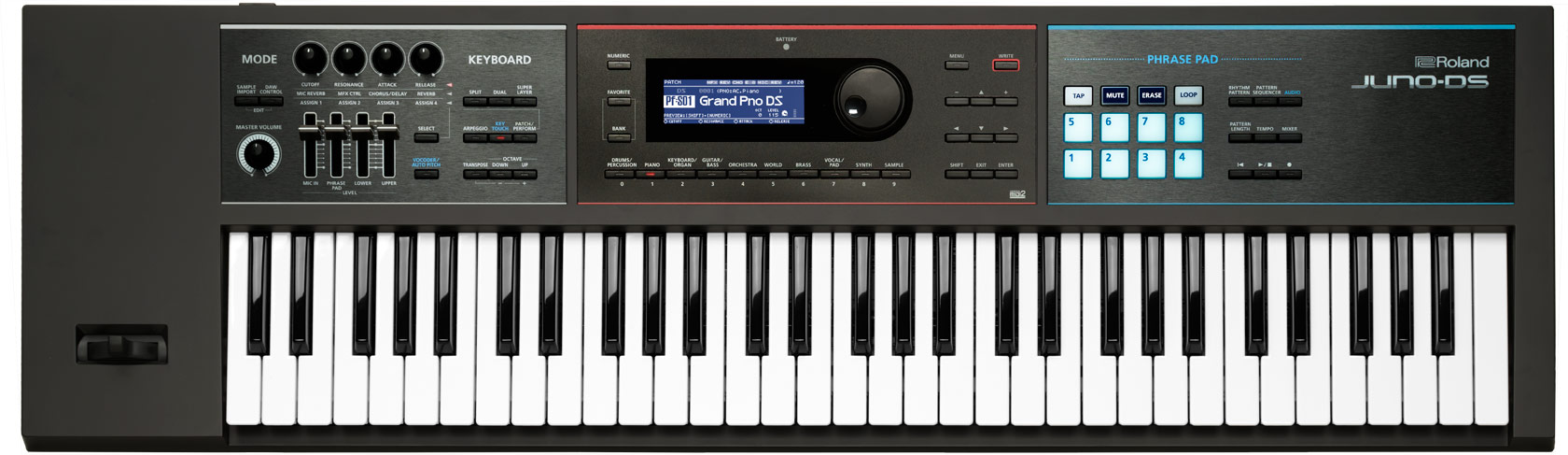
The Roland Juno-DS61 is a compact 61-key synth-action keyboard loaded with an impressive sound engine. It comes with over 1000 preset sounds, patches, sound manipulation, and more. And it does all this while retaining a portable lightweight profile that can even run on eight AA batteries.
With its expandable sound library and sound manipulation features, it'll take a long time for anyone to get through all of them. This can be daunting, especially for novices, but the steep learning curve rewards you with great sounds and better control over its many features. The end result is the improved quality of your productions and live performances.
Thankfully, you won't have to dive deep into menus to appreciate its high quality sounds. The audio engine does a good job of emulating the sound of acoustic pianos and electric pianos. It also has good organ, strings, and Hammond voicings. All of its core sounds are good, and this is the reason why the DS61 is one of the most professional keyboard workstations. Note that the Juno DS61 is a bit dated, but it still sounds as good, if not better than recently released keyboards.
The keys are not weighted but they work as intended, they are soft and easy to trigger. They are quite responsive, so expressive and dynamic playing is possible. In addition to its 61 synth style keys, the DS61 has phrase pads for triggering samples, and an 8-track pattern sequencer. There are also a whole host of buttons, along with knobs and faders for control over parameters. It is designed to be a mobile studio hub with audio and MIDI recording capabilities. It has a mic input to record vocals and built-in effects including vocal Auto Pitch.
All these features make the Juno-DS61 a true all-in-one synth, useful for everything from traditional piano style playing to modern EDM style performances. And it does so while having a sturdy yet portable profile. So if you are looking for a versatile, yet portable synthesizer workstation keyboard, then this is for you.
Tech Specs
- Keys: 61 Synth-Action Keys
- Polyphony: 128
- Sound Engine(s): Juno Engine
- Controllers: Pitchbend and Modulation Levers
- Audio Recording: Playback Format: ( bit, kHz, Stereo)
- Audio Playback: WAV, AIFF, MP3
- Sequencer: 8-Track/li>
- Audio Inputs: 1 x 1/4" (Mic), 1 x 1/8" (Aux)
- Audio Outputs: 2 x 1/4" (L/R), 1 x 1/4" (Headphones)
- MIDI: In/Out/USB
- Other Connections: 1 x 1/4" (Sustain), 1 x 1/4" (Control)
- USB: USB connector 1x TYPE B
- Power Supply: AC Adapter DC 12V
- Dimensions: 3.87" x 39.68" x 11.81"
- Weight: 11.75 lbs
| Website | Source | *Rating Value |
| YouTube | Scott Studio | 90/100 |
Demo
Casio Privia PX-360
Street Price:
Manufacturer:
Product Links:
- Made mostly of plastic
- Limited realtime controls
- 88 weighted hammer-action keys
- Hundreds of sounds and rhythm options
- 16 track MIDI and audio recording
- Student friendly interface and features
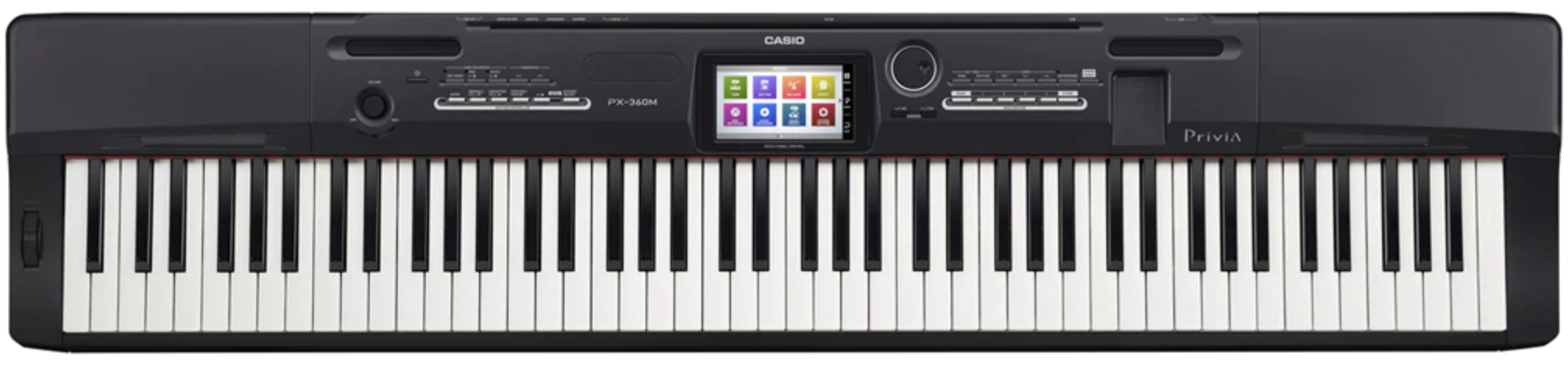
The Casio Privia-360 is a digital piano with workstation functions. It combines traditional weighted hammer action playing feel with modern recording functionality.
In keeping with its digital piano design, the PX-360 has an 88-key Tri-Sensor Scaled Hammer Action II keybed, which mimics the feel and response of the keys of an acoustic concert grand piano. This is an important feature for pianists and keyboardists who prefer the expressive feel of weighted keys. This also makes it a good instrument for learning and playing classical piano pieces.
Even with hammer action keys, this keyboard workstation is still reasonably portable, thanks to its lightweight plastic construction. And surprisingly, even with its mostly plastic construction, it has a solid and reliable feel to it. But I wouldn't risk having this keyboard fall or bump badly though, so handling care is important if you plan to carry this around.
Being a workstation keyboard, the PX-360 comes with tons of sonic options including 550 tones and over 200 rhythms. There's even a built-in Rhythm Editor which can be used to create and edit up to 10 User Rhythms with different accompaniment parts. It also has its own preset management system with advanced patch editing. It lets you easily edit, save, and load different configurations.
Central to its interface is a color touchscreen that lets you access its myriad of features in a modern yet intuitive manner. With it, you can quickly change into different voices, and choose from the many included built-in effects and rhythms. It is also where you can access its Music presets and recording feature for either MIDI (16 track) or audio. And since it is a touchscreen interface, going through the menus is easy without the need for too many buttons and knobs. As such it also frees up the front of the keyboard for a more streamlined look.
As expected, some tones sound better than others. In particular, the pianos, organs, and synth patches sound good. The percussion sound is also quite nice, which is unusual for a digital piano style keyboard.
Being a Casio keyboard, it comes with student-friendly features which include the duet mode. This splits the keyboard into two equal ranges for a teacher and student to play side by side. There's also classroom mode, which sends each side to an individual audio output.
All in all, the Casio Privia PX-360 is a good instrument for students and pianists who want to transition into home recording and music production.
Tech Specs
- Keys:88 hammer actioned keys
- Polyphony: 128
- Sound Engine(s): AiR Sound Source
- Controllers: Pitchbend
- Audio Recording: Playback Format: .wav (16bit, 44.1kHz, Stereo)
- Audio Playback: 100 Playback Format
- Sequencer: 16 Multitrack + 1 System Track 100 Songs
- Audio Inputs: 2 x 1/4" Line-in, 1 x 1/8" Stereo Mini
- Audio Outputs: 2 x 1/4" (L/MONO, R)
- MIDI: In/Out/Thru/USB
- Other Connections: 1 x 1/4" Damper Pedal, 1 x 1/4" Assignable Pedal
- USB: USB connector 1x TYPE B
- Power Supply: AC Adapter DC 12V
- Dimensions: 52.0" x 11.5" x 5.5"
- Weight: 26.2 lbs
| Website | Source | *Rating Value |
| Fire Inside Music | Jack Pound | 90/100 |
| YouTube | SamJammer | 90/100 |
Demo
The Best Keyboard Workstations Between $1000 and $2000
Roland Juno-DS76
- Requires familiarity to maximize its features
- Non-weighted keys
- Good balance of portability and playability
- Longer 76-key synth style keybed
- Great sounding core sounds
- Expansive sound options and features
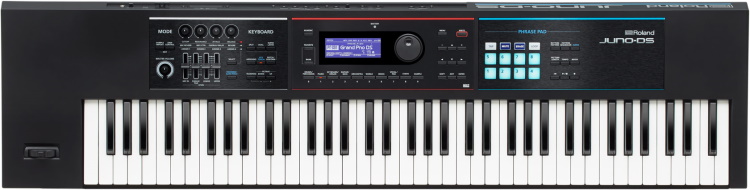
The Roland Juno-DS76 retains the portability and synth style keys of the DS series, but with a longer 76-note keybed. This makes it longer and heavier, but not as heavy as an acoustic piano. And it still retains a portable and busking friendly profile, complete with the ability to run on batteries (8 x AA).
This 76-key version of the Juno DS is a more recent release, meant to fill the space between the smaller DS61 and the bigger DS88. It has more keys for pianists to appreciate, but with less of the bulk and weight that you get from the DS88. While synth style keys found on the DS76 are expressive, note that they are not weighted, so there are compromises and benefits to achieve a good balance of playability and portability.
Sound-wise it's basically the same as its siblings. It gives you access to the same broad sound options, which include a selection of core instrument voices from Roland's popular piano, electric piano, and Hammond style sounds, to exotic sound samples, percussion, world instruments, and more. Even though it doesn't have Roland's SuperNATURAL piano engine, the core voices have good realism and response - better than most workstation keyboards. Its high quality sounds and versatility are the reasons why the DS series continues to be the staple gigging keyboard.
There are also plenty of other quality instrument and synthesizer samples, along with a myriad of synth sounds. To use them all, you'll need to have the time and patience to dive into the many features.
And as part of the DS series, it comes with workstation features that include internal or external audio and MIDI recording. This built-in audio interface makes this a great core instrument for a recording studio. It also has built-in effects, an 8-track sequencer, and mic input. It also comes with the same EDM-friendly set of phrase pads that you can use to trigger samples that you customized yourself.
All in all, you benefit from the sonic versatility of the DS series, while allowing for wider piano chords that are harder to do in smaller 61-key keyboards. And it does all this while retaining good portability. In addition to live accompaniment, the DS76 is also a suitable keyboard for studios with its workstation capabilities. It's easily one of the best professional music keyboards for stage and studio use.
Tech Specs
- Keys: 76 Synth-Action Keys
- Polyphony: 128
- Sound Engine(s): Juno Engine
- Controllers: Pitchbend and Modulation Levers
- Audio Recording: Playback Format: ( bit, kHz, Stereo)
- Audio Playback: WAV, AIFF, MP3
- Sequencer: 8-Track/li>
- Audio Inputs: 1 x 1/4" (Mic), 1 x 1/8" (Aux)
- Audio Outputs: 2 x 1/4" (L/R), 1 x 1/4" (Headphones)
- MIDI: In/Out/USB
- Other Connections: 1 x 1/4" (Sustain), 1 x 1/4" (Control)
- USB: 1x TYPE A (Samples), 1 x Type B (Audio/MIDI)
- Power Supply: AC Adapter DC 12V
- Dimensions: 4" x 48.5" x 12.25"
- Weight: 15.25 lbs
Demo
Yamaha PSR-SX700
- A bit bulky for a portable keyboard
- Button infested controls
- No trigger pads
- Feature packed yet portable
- Intuitive 7" touch screen control
- Lots of sounds and styles
- Responsive and realistic sounding core voices
- Intuitive accompaniment features
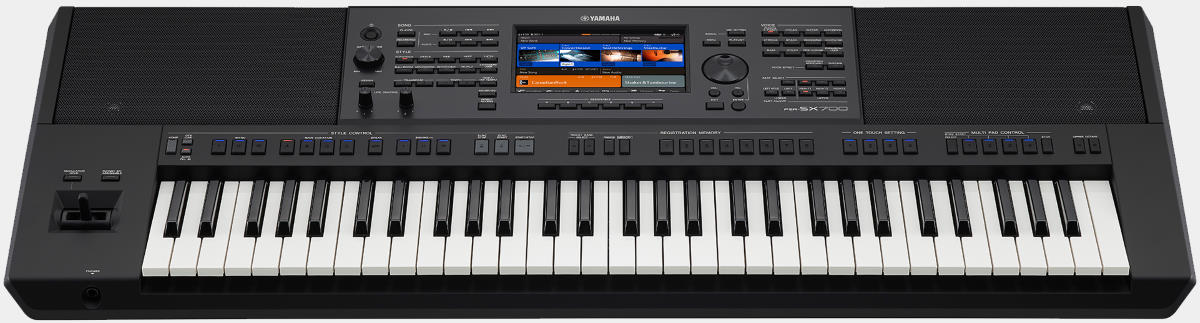
The PSR-SX700 is a keyboard packed with workstation and arranger features, and being part of Yamaha's Portable Sound (PSR) line, it does all this while retaining a lightweight profile that's easy to carry around.
There are a lot of sounds to play with - 986 voices, 41 drum/sfx kits, 400 styles, and more. And there are a lot of functions and parameters to control, hence its bulkier and button infested front fascia. Thankfully, the control layout is well thought out, especially its accompaniment and recording controls which are neatly positioned near the keys for quick access. At the core of its controls is a 7" LCD color touchscreen, which gives you access to important settings like Voice and Style assignments, as well as menus and other parameter settings. The screen layout is intuitive, so it really makes the workflow and overall playing experience easier.
Speaking of workflow, you can utilize Accompaniment Styles to add a more realistic sounding "backing band" to your playing. It works with you as you change your chords, much like a smart auto accompaniment tool. Another noteworthy feature of the PSR-SX700 is its joystick control, which can go up, down, and sideways - allowing for convenient control over both pitch and modulation.
The sound engine is up to par with similarly priced keyboards, thanks to Yamaha's VCM (Virtual Circuit Modeling). The core piano, organ, strings, and synth sounds all have good realism and they respond well to playing. Voices that use Yamaha's super articulation sound even more realistic. The PSR-SX700 sounds good even when listening through the built-in speakers.
It has a 61-key synth style keybed with 4 velocity sensitivity settings, allowing you to personalize the instrument's response. These keys won't appeal to those used to traditional acoustic pianos, but they are ideal for those who do one-man-band accompaniment style playing. For some reason, Yamaha didn't add trigger pads, they opted for buttons near the keys.
Other noteworthy features include synth filter-like sounds achieved via assignable real-time control knobs, 16 track song recorder, and compatibility with Yamaha's XG song format. Being a Yamaha workstation keyboard, expect it to be durable and reliable.
If you're looking for a portable all-in-one workstation arranger keyboard, then this is for you.
Tech Specs
- Keys: 61 Synth-Action Keys
- Polyphony: 128
- Sound Engine(s): AWM Stereo Sampling
- Controllers: Joystick for Pitchbend and Modulation
- Audio Recording: Playback Format: (16bit, 44.1 kHz, Stereo)
- Audio Playback: WAV, MP3
- Sequencer: 16-Track
- Audio Inputs: 1 x 1/4" (Mic/Guitar), 1 x 1/8" (Aux)
- Audio Outputs: 2 x 1/4" (L/R), 1 x 1/4" (Headphones)
- MIDI: In/Out/USB
- Other Connections: 1 x 1/4" (Sustain), 1 x 1/4" (Control)
- USB: 1 x TYPE A, 1 x Type B
- Power Supply: AC Adapter DC 16V
- Dimensions: 5.5" x 40.06" x 17"
- Weight: 25.37 lbs
| Website | Source | *Rating Value |
| YouTube | Danboarding | 94/100 |
Demo
The Best Workstation Keyboard in the $2000 to $5000 Price Point
Yamaha PSR-SX900
- May not appeal to pianists
- Steep learning curve
- No trigger pads
- Feature packed one-man-band instrument
- Tons of voices, styles, and effects
- Great sounding core voices
- Intuitive touchscreen interface
- Good balance of features and portability
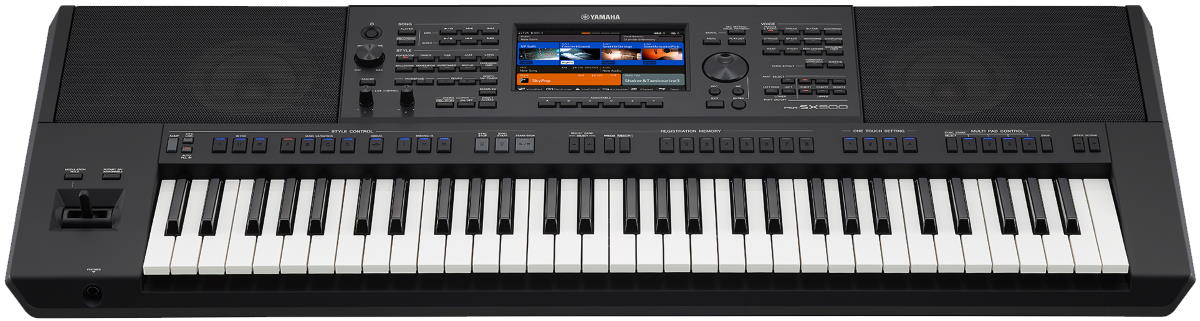
The SX900 is the flagship model of Yamaha's PSR-S line, and as such, it comes with the best that Yamaha can offer, all packed inside a portable instrument. It is similar in size and overall design to the SX700, but with expanded features that are meant to justify its premium price tag.
For starters, it has a staggering collection of 1337 Voices, some of which have Yamaha's "Super Articulation" feature that adds subtle details which mimic human playing techniques. This results in a more detailed and professional sound, faithful to the sampled instrument. As expected, piano sounds are top-notch, with good bass
definition and high-end clarity. The same can be said about its other core sounds, including organs, synths, guitar, strings, and the like. There are also 56 Drum/SFX kits to play with, along with 525 accompaniment styles. If you get a handle on the controls, which include 3 layer sound setup - you have enough voices and styles to cover every musical genre.
The 61 synth style keys work as intended, are easy to press, and have good response to dynamic playing. The keys also don't look or feel cheap at all. This will not impress pianists who are used to traditional keys, but they are not the target market of the SX900. With its accompaniment and style features, this keyboard workstation is great for one-man-band performers and is equally at home in a studio setting.
The downside to having all these sound options is that the learning curve is steep, and it'll take a while to go through all of them. It may seem overkill for the average musician, but having all these sounds is important for serious music production and content creation work. In addition to so many sounds, there are tons of parameters to tweak, which makes controlling the keyboard more complex. Thankfully, the 7" LCD color touchscreen makes diving through menus more bearable. The voices, styles, and parameters are laid out very well, which makes it very intuitive. It would've been nice if there were trigger pads included.
The main strength of the PSR-SX900 is its accompaniment function, and in line with that, it has special features like chord looper that lets you record and play chords so you can free up your left hand. Another distinct function of the SX900 is its built-in vocal effects, which let you apply vocal harmony, synth Vocoder, and more. In addition to live performance and music production, the arranger functionality of this keyboard is detailed enough for use in songwriting and for recording rough demos of your song ideas.
Other noteworthy features include Bluetooth compatibility, expanded input/output options, 16 track song recorder, and compatibility with Yamaha's XG song format.
The Yamaha PSR-SX900 is a feature packed all-in-one accompaniment machine with good portability, ideal for one-man-band musicians.
Tech Specs
- Keys: 61 Synth-Action Keys
- Polyphony: 128
- Sound Engine(s): AWM Stereo Sampling
- Controllers: Joystick for Pitchbend and Modulation
- Audio Recording: Playback Format: (16bit, 44.1 kHz, Stereo)
- Audio Playback: WAV, MP3
- Sequencer: 16-Track
- Audio Inputs: 1 x 1/4" (Mic/Guitar), 1 x 1/8" (Aux)
- Audio Outputs: 2 x 1/4" (L/R), 1 x 1/4" (Headphones)
- MIDI: In/Out/USB
- Other Connections: 1 x 1/4" (Sustain), 1 x 1/4" (Control)
- USB: 2 x TYPE A, 1 x Type B
- Power Supply: AC Adapter DC 16V
- Dimensions: 5.5" x 40.06" x 17"
- Weight: 25.35 lbs
| Website | Source | *Rating Value |
| YouTube | ePianos.co.uk | 92/100 |
| YouTube | Woody Piano Shack | 94/100 |
Demo
Things to Consider when Buying a Keyboard Workstation
-
Workstations are a type of keyboard meant to be an all-in-one instrument for composers, music producers, and performers. As such they are generally equipped with almost everything that can accommodate your performance, recording, and production needs. There are several functions that set them apart from Digital Pianos vs Keyboards, arrangers, and other professional keyboards. These functions includes MIDI/USB control and recording, audio recording, editing features, and built-in effects that are helpful in creating and finalizing songs. Since they are meant for composing and recording songs, manufacturers tend to include massive sound libraries with a wide array of instruments. In addition to those aspects, most of them have good quality synthesizers that can be used for composing full-length multi-voice tracks. Workstation keys blur the lines between Synthesizer vs Keyboard features.
-
Sound quality and quantity matters whether you plan to use your workstation to produce music or for general playing purposes. As mentioned above, workstations have a wide array of instrument presets, such as pianos, horns, strings, and percussion that are on par with the quality of what dedicated synthesizers can provide. A simple playback synth, or one with sample libraries, is a reasonable option if you want an authentic reproduction of sounds such as pianos, percussion, string section, and brass section. If you plan to incorporate electronic music, a workstation with an analog modeling synthesis feature also works well. Regarding sound quantity, it's highly recommended to look for a workstation that can handle and provide enough polyphony for playing and recording. The more notes it can handle, the more you can maximize your use of sequencing and recording multiple tracks.
-
Since workstations are designed to address composition and production needs, the main features to keep in mind are their sequencing and recording capabilities. Workstations already have built-in MIDI sequencers for capturing, adding, and editing tracks. Some of them also have a microphone or line input that lets you incorporate audio to sequenced tracks. Another feature to consider that would take your recordings to the next level are its onboard effects. Most workstations have the basic built-in effects that can be applied to individual tracks and/or the whole mix. Some of them that have audio recording capabilities have EQ and dynamic related effects. These provide more flexibility when it comes to personalizing your final sound.
-
Memory is a considerable factor, especially when storing and accessing mixes. The types of memory you’ll find in a workstation are ROM and RAM. ROM lets you switch out different sound cards to access variety of sounds, while RAM is the amount of memory that can be used for recording, sampling and storing custom settings. It’s best to prioritize the amount ROM if you plan to focus on performing and playing the instrument. Otherwise for recording, it’s best to look for a large amount of RAM. Some workstations provide removable and expandable memory slots for memory cards and external hard drives too.
-
Connectivity is also another feature to consider since a lot of them come with USB or 5-pin MIDI connections for connecting and syncing them to your computer. Good workstation keyboards can work well with DAW software, especially those with convenient control mapping features. There are some workstations that include an audio sampler. This enables you to import any audio file to incorporate to your mix as long as they are compatible with your workstation. Having audio inputs for directly recording instruments is another plus. This includes modern Bluetooth streaming functionality, which is quickly becoming a standard feature among modern musical gear. These are some of the useful features that can maximize the use of your workstation.
Differences between Workstation Keyboards and other Keyboards
Sound Quality and Quantity
Sequencing, Recording and Effects
Memory Capacity
Other Features
Best Keyboard Workstation Selection Methodology
The first edition was published in 2018. The current edition was published on Ma, 2023.
We began by looking at all the Workstation Keyboards available from major American online music gear stores and for this edition, we placed 40 of them on a short-list for further examination - you can see them in our Music Gear Database. We then examined feedback from users and experts in the form of written reviews, ratings and forum discussions, including the most recent feedback up. All these data were then fed to the Gearank Algorithm to produce the rating scores out of 100 that you see above - there were over 5,700 sources analyzed during this process. Finally, we selected the highest rated options to recommend in each of the price brackets above. For more information about our methods see How Gearank Works.
About the Author and Contributors
Here are the key people and sources involved in this guide's production - click on linked names for information about their music industry backgrounds.
Lead Author & Researcher
Alexander Briones
I have been writing about and researching music gear for many years, all while serving as a music director at my local church. I engage in guitar playing and singer-songwriter stints, in addition to mentoring young musicians and teaching guitar and bass.
Roland keyboards have been a staple instrument at our church, and for good reasons - they are reliable, practical and sound good. The Juno DS61 in particular is something that I've been seeing often in events and gigs, so I'm not surprised to find it rating high enough to be recommended in this guide.
Contributors
Jason Horton: Editing and illustrating.
Media
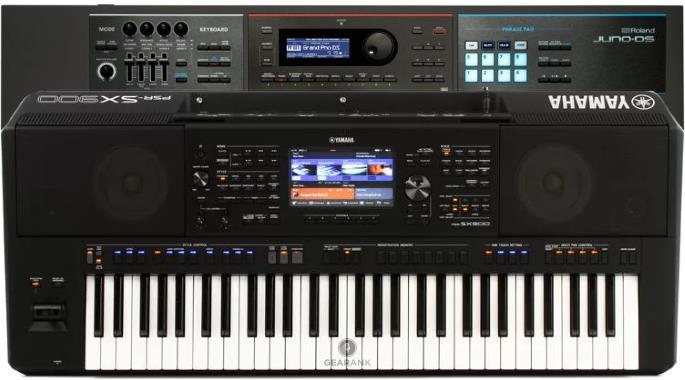
Main/Top Image: Compiled using photographs of the Roland Juno-DS61 and Yamaha PSR-SX900.
The videos have been embedded in accordance with YouTube's Terms of Service.
The individual product images were sourced from websites, promotional materials or supporting documentation provided by their respective manufacturers.
 The Best 49 Key MIDI Controller Keyboards
Comments
Publication of our 2022.10
Submitted by Jason Horton on
Publication of our 2022.10 Edition resulted in the following keyboards coming off the recommended list above:
We've removed the Korg Kronos
Submitted by Jason Horton on
We've removed the Korg Kronos 61 due to it being discontinued.
Publication of our February
Submitted by Jason Horton on
Publication of our February 2022 Edition resulted in the following workstations coming off the recommended list above:
Publication of our May 2021
Submitted by Jason Horton on
Publication of our May 2021 Edition resulted in the following workstation coming off the recommended list above, but you can still see our analysis of it: Korg Kross 2.
What are your opinions
Submitted by Dr. Prashun Guha (not verified) on
What are your opinions regarding the Yamaha Genos and the Yamaha PSR-SX900 Workstations?
I understand that the Yamaha
Submitted by Tony Austin (not verified) on
I understand that the Yamaha Montage and MODX recently updated their onboard sequencer/recorder. Is it (the sequencer/recorder) on the same level as the MOXF? This has previously been the only reason for me not pulling the trigger on the newer Yamaha workstations.
As a result of our May 2020
Submitted by Jason Horton on
As a result of our May 2020 update the following came off the recommended list above, but you can still see our analysis of them:
Is there an advantage with
Submitted by Winston (not verified) on
Is there an advantage with the newer Yamaha MODX over the MOXF series? Or should I stay with my MOXF8?
sold my roland FA series...it
Submitted by poppaG (not verified) on
Sold my roland FA series...it sucked bought an moxf instead, way better sounds...WAY
എന്ത് കൊണ്ട് കോർഗ് pa
Submitted by റോയി കണ്ണൂർ കോറോം (not verified) on
Why does the Korg pa 1000 lack good quality?
[Translated from Malayalam using Google Translate]
We haven't analysed the the
Submitted by Jason Horton on
We haven't analyzed the the Korg Pa1000 yet so unfortunately we can't answer your question at this time.
Very useful information..
Submitted by Steve (not verified) on
Very useful information...well explained, but why Yamaha s970 is not here?
We have the Yamaha PSR-S970
Submitted by Jason Horton on
We have the Yamaha PSR-S970 classified as an Arranger keyboard rather than as a Workstation which is why we didn't include it in this guide.
What about the Juno ds-88?
Submitted by Bubu (not verified) on
What about the Juno ds-88?
It's a good keyboard with
Submitted by Jason Horton on
It's a good keyboard with high ratings which you can see here, but we have it classified as a synthesizer rather than a workstation which is why it's not listed above.
Roland FA series. Should not
Submitted by Thomas Howard (not verified) on
Roland FA series. Should not be here at all. they suck. Cheap! Cheap! Every Corner they could cut was done. And then some. The D/A A/D converters are so bad it is unbelievable!
Thanks for sharing your
Submitted by Jason Horton on
Thanks for sharing your opinion. When we produced this guide we examined over 800 opinions, over 90 of those were specific to the Roland FA-08, and based on the broad opinion of the market it did deserve to be included in our recommended list.
If you'd like to know more about how we do this analysis, please read How Gearank Works.